Blog Themes
Create reusable content themes that define what BlogoBot should write, how it should research, what style it should use, what images it should create and where the final content should go.
- Create entire thematic content streams, not just single blog posts
- Set up a theme once and let it run repeatedly on autopilot
- Run multiple themes in parallel to drive diverse content channels
How it works
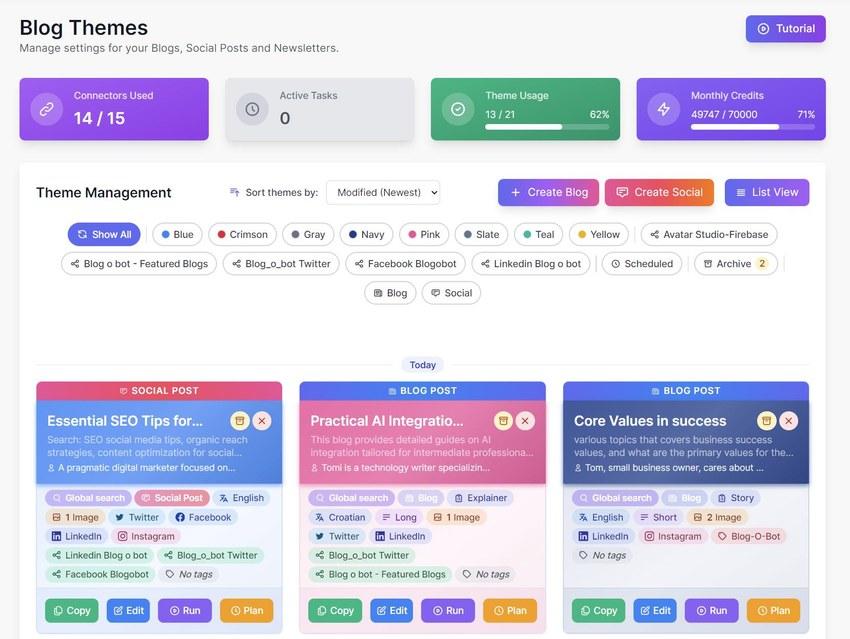
Blog Themes are the creative engine of the application. A theme is not just one blog post. It is a repeatable content direction that can generate multiple blog posts over time, each with its own research logic, content structure, visual setup, social posts, branding and publishing rules.
Key capabilities and details
Theme overview
Themes work like reusable content modules. A user can create multiple themes, each with a different purpose, schedule, destination and social output.
Theme Wizard
A guided setup flow for creating or editing a theme. The wizard contains the main configuration layers: basic information, content setup, images, social posts, branding and publishing.
Basic Info
Define the topic, author, personality, article brief, positive tags, negative prompts and research sources. The theme can be very precise or left more open for flexible AI interpretation.
AI Helper / AI Create
AI can help fill or draft the theme settings, giving users a starting configuration they can adjust instead of writing every field manually.
Research Sources
Choose where the content should pull knowledge from: internet search, internal documents, discussion research or selected source combinations.
Discussion Research
Before writing, the system can look at real discussions and questions from platforms like Reddit or similar sources. This helps the article start from what people actually care about, not only from a generic keyword.
Content setup
Choose blog type, language, length, SEO options, FAQ sections and internal linking. The content layer defines what kind of article should be created and how optimized it should be.
Images setup
Define up to three images per blog, with presets, aspect ratio, custom prompts, AI provider selection and optional use of internal images or documents.
AI image editing
Uploaded or internal images can be used as source material and transformed so they fit the topic, brand, product, person or article context.
Social posts
Generate connected social posts from the blog. Each platform can have its own tone, length, hashtags, graphics, first comment and variation count.
Branding
Connect a theme with a brand profile so the generated content follows brand identity, voice, rules, links and product context.
Publishing
Choose where content should go after generation: WordPress, social platforms, databases or other connected destinations. Publishing can work with autopublish or approval flows.
Blog Themes and Social Post Themes
Blog Themes generate full blog content and related outputs. Social Post Themes are smaller, focused themes made only for social media posts. Both can be copied, edited, run manually or scheduled.
Build a theme once, then let it become a repeatable content engine.
Connect your brand knowledge and start running high-quality, hands-off automated content generation workflows today.