Reports Library
The complete library of generated content. See every report, article, image, social post, SEO version and publishing action — then edit, regenerate, copy, optimize or publish from one place.
- Crawlable list and card grids for all generated content with filters
- Detail view acts as an editor workspace for articles, socials, and media
- Edit, regenerate, translate, compare SEO, and publish from one screen
How it works
Reports closes the loop between creation, scheduling and publishing. Blog Themes define what should be created, Planner defines when it should happen, and Reports shows what was actually generated and what can be done with it next.
Key capabilities and details
Report cards
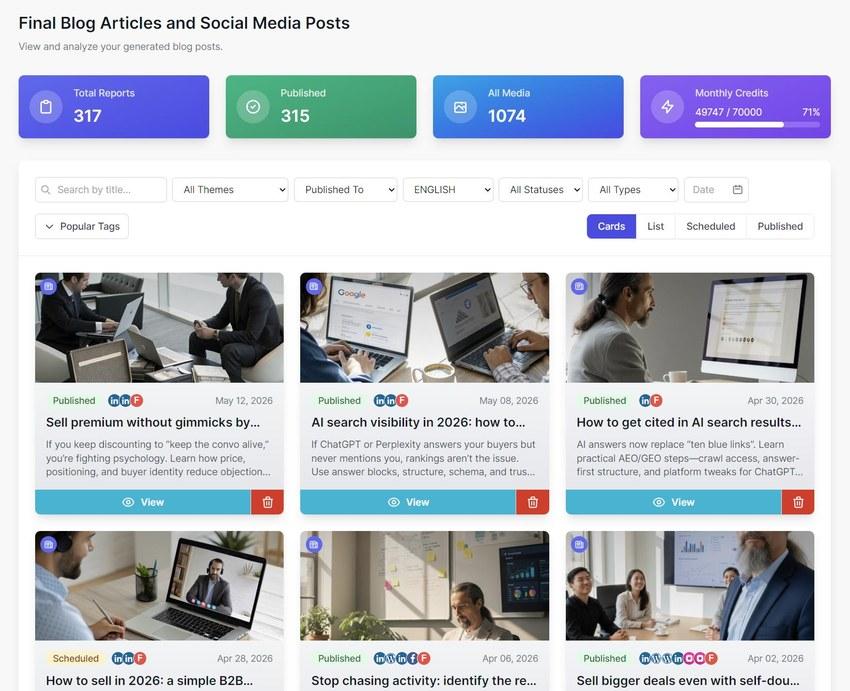
Generated content appears as visual cards with image, title, summary, date and publishing indicators. Users can quickly scan what has been created.
Card view and list view
Switch between a visual card layout and a more operational list view for managing larger amounts of content.
Filters and organization
Filter reports by name, theme, status, type, date, tags or publishing platform. Useful when the content library grows over time.
Scheduled and Published views
See what has already been published and what is scheduled. Published content can be viewed in calendar or list format.
Report detail view
Open any report as a working content space. View the article, SEO version, social media posts, images, publishing history and available actions.
Original and SEO version
Compare the original article with the SEO-optimized version and review SEO performance information when available.
Rich text editing
Edit the generated article directly in a rich text editor, then save changes before publishing or copying.
Regenerate
Generate a new version of the report. Useful for variations, changes in direction or creating a new version in another language. This is not just translation — it can be rewritten from the beginning in a new language.
Social Media tab
View social post variations and related images created from the report. Social content can be manually published if it has not been published already.
Media tab
See all generated images connected with the report, including blog visuals and social visuals.
Publishing History
Track where and when content was published. Useful when one report produces multiple outputs across different connectors.
Quick actions
Publish, regenerate, SEO optimize, edit, copy for LinkedIn, copy rich text or copy plain text — all from the report detail view.
Manage every generated output from one content workspace.
Connect your brand knowledge and start running high-quality, hands-off automated content generation workflows today.